As you might know from our Payments Guide, one of the steps to getting paid is submitting your tax information. We've recently updated the Tax Information page located under your My Account tab with a new format that we hope will make it easier to determine which form is right for you. Also, you'll now be able to see when your information was last saved so that you can make sure all updates have been recorded in our system.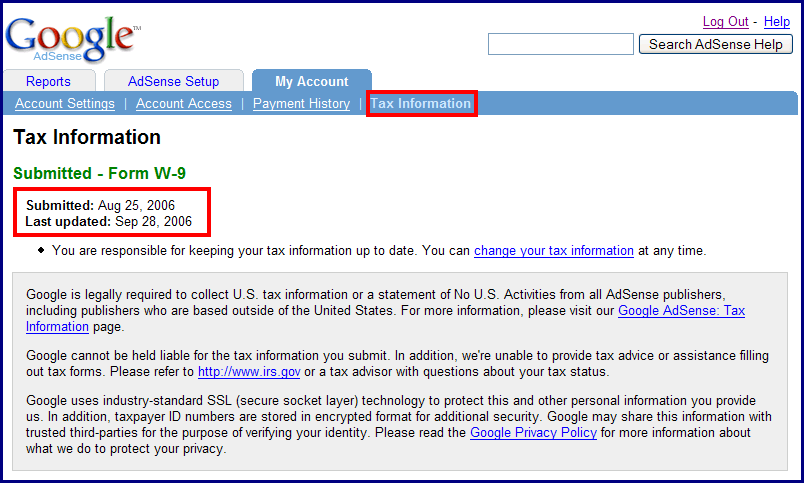
Every publisher's tax situation is different, but we aren't able to provide any tax advice. To help determine what's right for you, we recommend walking through the tax wizard in your account or visiting our Help Center for additional help. If you're not able to find the information you're looking for, we encourage you to speak directly with your local tax advisor.
Thursday, November 30, 2006
A non-taxing tax wizard
Share this
Related Articles :
Subscribe to:
Post Comments (Atom)

Labels
AdSense features
94
Optimization
88
Other
69
Other Google products
42
Mobile
39
International
35
Program Policies
26
Tips
26
Multi-Screen
23
Case studies
21
Video
21
Content strategy
20
AdSense Interface
19
AdSense Team
19
Best Practice
19
Earnings/Reports
19
Payments
19
Ad formats
18
AdSense101
11
Tips to earn more
11
Viewability
11
adsense guide
11
Active View
9
Global
8
Produce update
8
googlenew
7
Ad layout
6
AdSense In Your City
6
Facts and Fiction
6
Feedback
6
Google Analytics
6
Learn with Google for Publishers
6
Matched content
6
Newbie
6
PageSpeed
6
download
6
DoubleClick
5
Education
5
Support
5
guide
5
micro-moments
5
AskAdSense
4
Certified Partners
4
Passion into profit
4
Social
4
Webinars
4
audience
4
eBook
4
engagement
4
AMP
3
Responsive
3
Google's Certified Publishing Partner
2
News
2
infographic
2
native ads
2
Appeal
1
Branding
1
CPT
1
CTR
1
Guest Blogger
1
Hangout on Air
1
Help
1
Japanese
1
Material Design
1
Monetization
1
Portuguese
1
Product update
1
RPM
1
Spanish
1
Troubleshoot
1
YouTube
1
get started
1
Powered by Blogger.
0 comments
Post a Comment