If you have a blog on the new version of Blogger in beta, we're happy to introduce you to the drag-and-drop AdSense widget! Using this new feature, you can easily add AdSense to your blog by following these instructions.
1. First, log into the new version of Blogger with your Google Account. Click on the Layout link next to the blog where you’d like to feature Google ads.
(If you don’t see the Layout option, it’s possible that your beta blog is still in the classic template -- visit your blog’s Template page and click Customize Design. You can then upgrade your blog to the new template in minutes.) 
2. Next you should be taken to your Template – Page Elements page. Click on one of the Add a Page Element links shown below.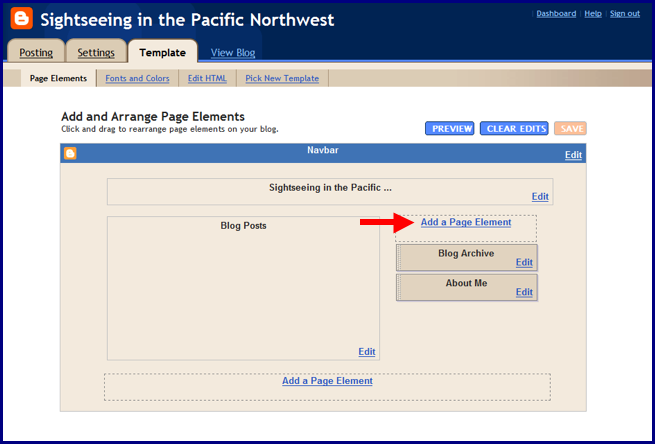
3. In the pop-up window, click the blue Add to Blog button underneath the AdSense option.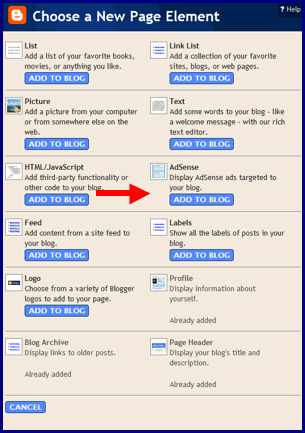
4. If you already have an AdSense account, simply sign in with your AdSense login; if not, you can create an account directly on this page. After signing in, you can select your preferred color template and ad format. When you're finished, click on the orange Save Changes button.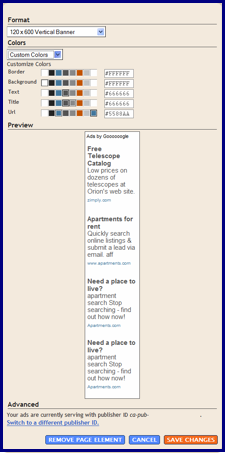
5. Now you can easily drag and drop your AdSense ad unit anywhere on your blog's template -- or delete it if you need to make changes. When you're all done, click the orange 'Save' button on the upper right corner and go view your new blog!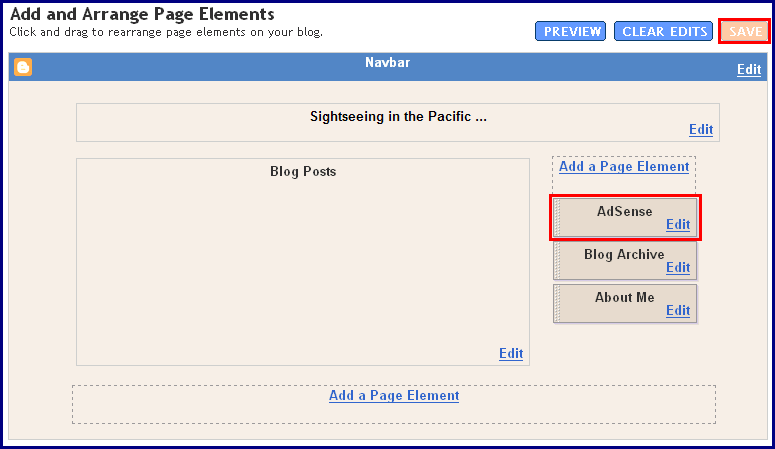
We hope you find this new feature helpful when implementing your ads. Let us know if you have any comments or suggestions.
Tuesday, October 24, 2006
When AdSense met Blogger (in beta)
Share this
Related Articles :
Subscribe to:
Post Comments (Atom)

Labels
AdSense features
94
Optimization
88
Other
69
Other Google products
42
Mobile
39
International
35
Program Policies
26
Tips
26
Multi-Screen
23
Case studies
21
Video
21
Content strategy
20
AdSense Interface
19
AdSense Team
19
Best Practice
19
Earnings/Reports
19
Payments
19
Ad formats
18
AdSense101
11
Tips to earn more
11
Viewability
11
adsense guide
11
Active View
9
Global
8
Produce update
8
googlenew
7
Ad layout
6
AdSense In Your City
6
Facts and Fiction
6
Feedback
6
Google Analytics
6
Learn with Google for Publishers
6
Matched content
6
Newbie
6
PageSpeed
6
download
6
DoubleClick
5
Education
5
Support
5
guide
5
micro-moments
5
AskAdSense
4
Certified Partners
4
Passion into profit
4
Social
4
Webinars
4
audience
4
eBook
4
engagement
4
AMP
3
Responsive
3
Google's Certified Publishing Partner
2
News
2
infographic
2
native ads
2
Appeal
1
Branding
1
CPT
1
CTR
1
Guest Blogger
1
Hangout on Air
1
Help
1
Japanese
1
Material Design
1
Monetization
1
Portuguese
1
Product update
1
RPM
1
Spanish
1
Troubleshoot
1
YouTube
1
get started
1
Powered by Blogger.
0 comments
Post a Comment